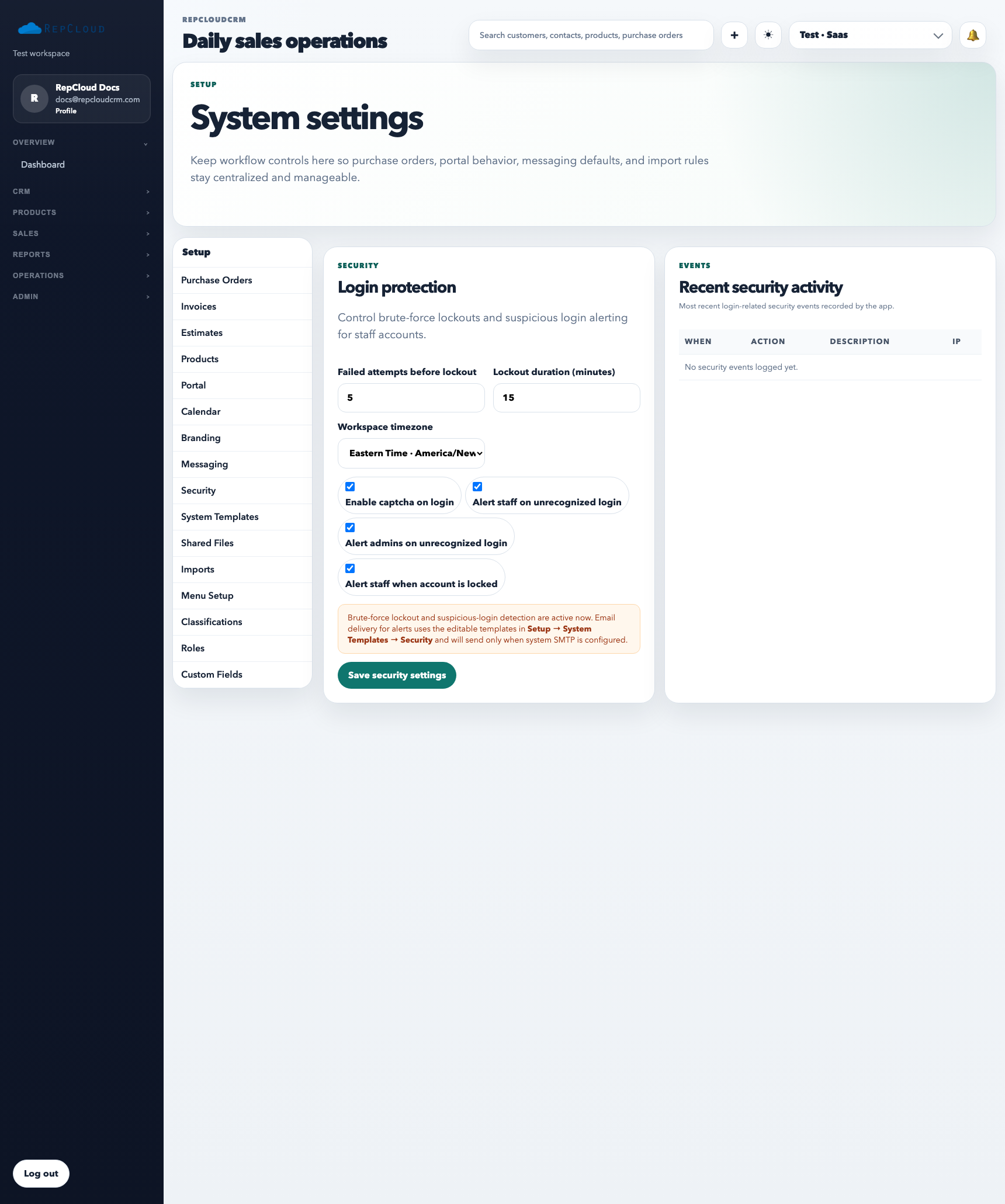
The Security area in Setup is where admins define workspace guardrails. These settings are not day-to-day workflow tools. They exist to control how safely people can access the workspace and how the system responds when something looks wrong.
Security controls shape how the workspace reacts to failed logins, suspicious access, and automated alerts. Treat these settings as infrastructure, not convenience toggles.
What Security controls are for
Reviewing login and access protection defaults
Controlling admin-level security options that affect the whole workspace
Reducing accidental exposure caused by weak access practices
Setting expectations for who can reach sensitive areas
What to review in this tab
Failed attempt threshold and lockout timing: decide how aggressively the workspace should slow down repeated bad logins.
Captcha behavior: keep this enabled when customer-facing login traffic is active and you want less automated abuse.
Alert options: make sure the right people get notified when suspicious access or lockouts happen.
How to use it well
Review Security settings as part of workspace launch, not after a problem happens.
Keep security changes limited to a small number of accountable admins.
Document major changes so staff lockouts or stricter access behavior do not surprise the team.
Best practices
Do not loosen security just to work around a short-term staff issue. Fix the role or process instead.
Revisit security settings when leadership, admin staffing, or customer access policy changes.
Treat these controls as workspace infrastructure, not as personal preferences.